Checkout with Confidence
Payment Security Guaranteed
Return with Ease
Fast & Hassle-Free Process
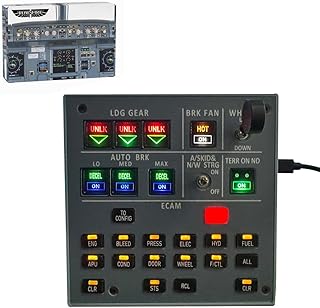
The Kidaromo Landing Gear Indicator & ECAM Integrated Control Panel is ideal for flight simulation enthusiasts who seek an immersive and realistic flying experience. This accessory is designed for home flight simulator setups and is compatible with leading flight simulation games on Windows. It addresses the need for precise control and feedback during simulated flights, enhancing the realism of various aircraft operations. Its USB connectivity ensures easy integration with existing systems, making it a practical choice for both casual gamers and serious flight simulation pilots looking to upgrade their home cockpit setup.
This control panel is best used in conjunction with flight simulation software, providing essential indicators for landing gear status. It is designed to easily connect via USB, ensuring compatibility with Windows systems. Users should keep the panel clean and dust-free for optimal performance, and it is recommended to verify compatibility with specific flight simulation games before use. The product includes the control panel and any necessary cables.
Kidaromo USB Landing Gear Indicator & Control Panel for Flight Simulators on Windows
Key Takeaway
Enhance your flight simulation experience with this Kidaromo Landing Gear Indicator & ECAM Integrated Control Panel, designed specifically for home flight enthusiasts. Priced at £163.99, this USB-compatible accessory seamlessly integrates with leading flight simulation games on Windows, providing realistic feedback and controls that make every flight feel authentic. Ideal for both novice and experienced pilots, it elevates your virtual flying to new heights!
Frequently Asked Questions
What is Kidaromo Landing Gear Indicator & ECAM Integrated Control Panel?
The Kidaromo Landing Gear Indicator & ECAM Integrated Control Panel is a specialized accessory for flight simulators. It enhances the realism of flight simulation experiences by providing integrated controls and indicators.
How much does Kidaromo Landing Gear Indicator & ECAM Integrated Control Panel cost?
The price of the Kidaromo Landing Gear Indicator & ECAM Integrated Control Panel is £163.99. This investment offers a significant upgrade to your home flight simulator setup.
What are the key features of Kidaromo Landing Gear Indicator & ECAM Integrated Control Panel?
Key features include USB compatibility, integration with leading flight simulation games, and a user-friendly control panel design. It also provides real-time feedback for landing gear status, enhancing the simulation experience.
Who is Kidaromo Landing Gear Indicator & ECAM Integrated Control Panel best for?
This product is ideal for flight simulation enthusiasts and professional pilots looking to enhance their training. It caters to users of all skill levels who want a more immersive flying experience.
How do I use/care for Kidaromo Landing Gear Indicator & ECAM Integrated Control Panel?
To use the Kidaromo Landing Gear Indicator, simply connect it via USB to your computer and configure it with your flight simulation software. For care, keep the device clean and avoid exposure to moisture to ensure longevity.
Fast Delivery
Quick & reliable shipping
Secure Shopping
100% secure transactions
Great Prices
Competitive deals daily
Expert Support
Here to help you choose
More Products You Might Like from joysticks
View All


Please Note: When you order through these links, we may earn a commission at no additional cost to you.